
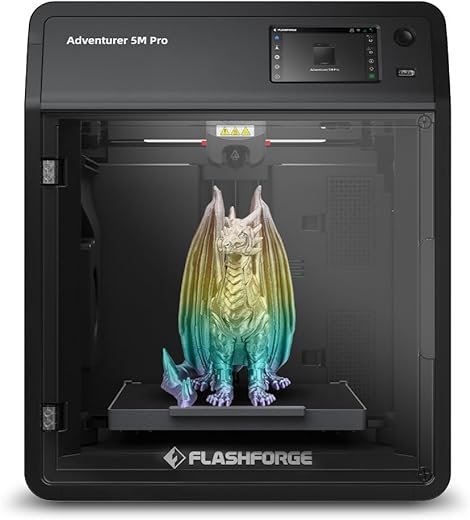




FLASHFORGE Adventurer 5M Pro 3D Printer 600mm/s High-Speed, 1 Click Fully Auto Leveling with 0.4&0.6mm Quick Detachable Nozzle Bundle, Auxiliary Chamber Cooling, Silent Printing and Remote Control
- All prices mentioned above are in Indian Rupee.
- At amazon.in you can purchase FLASHFORGE Adventurer 5M Pro 3D Printer 600mm/s High-Speed, 1 Click Fully Auto Leveling with 0.4&0.6mm Quick Detachable Nozzle Bundle, Auxiliary Chamber Cooling, Silent Printing and Remote Control for only
- The lowest price of FLASHFORGE Adventurer 5M Pro 3D Printer 600mm/s High-Speed, 1 Click Fully Auto Leveling with 0.4&0.6mm Quick Detachable Nozzle Bundle, Auxiliary Chamber Cooling, Silent Printing and Remote Control was obtained on October 5, 2026 3:19 am.
Best deal at:  amazon.in
Buy for best price  amazon.in
FLASHFORGE Adventurer 5M Pro 3D Printer 600mm/s High-Speed, 1 Click Fully Auto Leveling with 0.4&0.6mm Quick Detachable Nozzle Bundle, Auxiliary Chamber Cooling, Silent Printing and Remote Control
Description
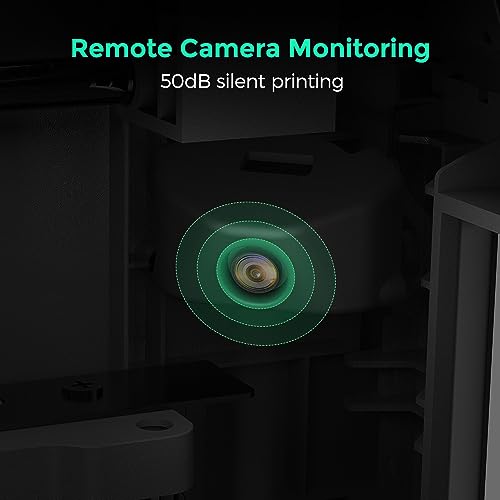
- 【Versatile 3D Printer & Quiet Printing】Adventurer 5M Pro is a versatile tool that can be used for parent-child bonding activities, household repairs, and creative teaching. Its fully enclosed design allows you fast and easy use while enjoying the process. Standard mode: 50dB; an additional low-speed silent mode to ensure uninterrupted focus during work or study.
- 【Advanced Auto-Leveling System】The Adventurer 5M Series is equipped with an automatic leveling system that can be activated with just one click. It utilizes distance measurements to calculate the necessary offsets, eliminating the need for manual Z-axis calibration. This ensures a flawless first layer every time.
- 【Secure Printing Assured】Your health is our concern. Adventurer 5M Pro features a closed structure and dual filtration system to optimize air quality during printing. It includes a HEPA13 and activated carbon filter to block 99% of particulate matter and VOCs, making it safe for home or classroom use.
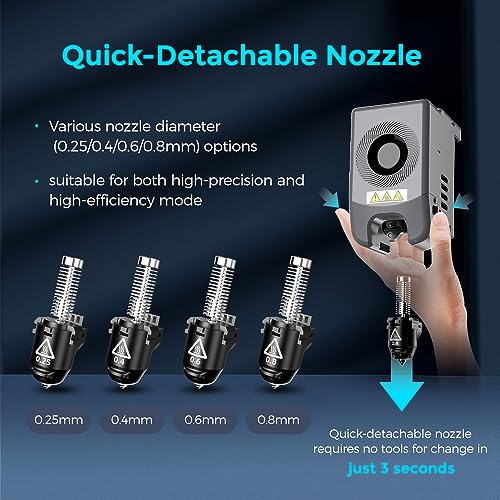
- 【Support Multi-Material Applications】Equipped with 280℃ high-temp direct drive extruder and multi-diameter quick detachable nozzles available: 0.25/0.4/0.6/0.8mm, free choice of high fineness and high efficiency mode printing, matching a variety of filaments: TPU, ASA, PLA, ABS, PETG, PLA-CF, PETG-CF.
Additional information
Specification: FLASHFORGE Adventurer 5M Pro 3D Printer 600mm/s High-Speed, 1 Click Fully Auto Leveling with 0.4&0.6mm Quick Detachable Nozzle Bundle, Auxiliary Chamber Cooling, Silent Printing and Remote Control
|
Price History
-
Reviews (9)
9 reviews for FLASHFORGE Adventurer 5M Pro 3D Printer 600mm/s High-Speed, 1 Click Fully Auto Leveling with 0.4&0.6mm Quick Detachable Nozzle Bundle, Auxiliary Chamber Cooling, Silent Printing and Remote Control
Show all
Most Helpful
Highest Rating
Lowest Rating


Tyler –
Well, I have to say I am very impressed with this little guy. Since I had been using a 2019 printer of a different brand, with a much larger footprint, when I downsized to this one, I was not expecting the print quality that I am seeing.Pros: Small footprint, was up and running in under 10 minutes, all metal frame, X,Y,Z axis, nice controller once you get used to it, has handled all types of PLA so farCons: Small build limit, not crazy about a filament feed tube, no auto shutoff (the Pro version has it for a couple hundred dollars more), it continued to try to print with an empty feed due to a tangle (but only on the loose sample, never on rolls), I couldn’t get it to connect to our wi-fi, but I didn’t try the 2.4g extender, only the 5g mesh router.So far, the learning curve was easy. I had a printer before, so that may have helped a lot. But I think the biggest hurdle is always the new software. This particular printer does best with the recommended Orca Slicer. I either download STL files from Thingiverse or make my own STL files from Fusion 360. I import them into Orca Slicer and size and tweak as needed. Then slice the plate, and export to g-code to a memory stick. That then goes into the control panel on the printer itself. Very easy to get to, it’s at the top front of the printer.It’s now printing a 12+ hour job and I’ll try to post it when it finishes. Aside from these prints in the photos, I have only done a tiny sample tugboat and it came out very smooth.
rick –
I’ve had the printer for little over 2 weeks and have printed loads of things. I came from having a Elegoo Neptune 4 pro to this beast that automates all the tuning that would make people jump down a rabbit hole just to find the settings that sort of works to put down a solid first layer. The 5M Pro makes printing more streamline without the hassle of manual adjusting after every print or so. The unboxing was pain free and is well packaged. I was printing in about 15 minutes after unboxing and going through the auto leveling process. It takes little to no assembly (thats if you’re not putting on the rear mounted spool holder). The noise isnt too bad as it is an enclosed printer but the fans can be a little much (may look into a fan mod here soon) thats my only gripe. I’d recommend this to anyone who is looking to get into 3D printing and wants the room to grow into not out of since the printer can handle pretty much any materials you through at.
Tyler –
If you’re new to 3D printing, this might be the best printer for you.It’s inexpensive, fast, and accurate. While I’m giving this printer 5 Stars I don’t think you should buy it unless you have budget constraints. I think you should buy the Adventurer 5M Pro. It costs more but comes with some features you might want in the future such as the capability to print ABS or other high-temperature plastics that need an enclosed printer. The Pro has ventilation fans, HEPA/carbon filters, and a camera for observing your prints from the FlashForge software.you should definitely consider the Adventurer 5M or 5M Pro. It wasn’t for me but nearly ideal for someone just getting into the hobby.
Tyler –
Super fast setup and use. Print speeds are quick. 3rd print in I committed to a bigger dragon, went to sleep and woke up to a flawless print. Enclosure keeps the noise to a minimum.
C. Harris –
Super fast setup and use. Print speeds are quick. 3rd print in I committed to a bigger dragon, went to sleep and woke up to a flawless print. Enclosure keeps the noise to a minimum.
Amazon Customer –
Super fast setup and use. Print speeds are quick. 3rd print in I committed to a bigger dragon, went to sleep and woke up to a flawless print. Enclosure keeps the noise to a minimum.
C. Harris –
The setup is easy. Just read the instructions and you’ll be fine. The printer setup goes smoothly, except for when it cleaned the nozzle, it moved to the rear of the machine and scraped the nozzle across the plate scratching it at the very back, the print area isn’t affected by this but the machine shouldn’t have done this. It should have asked the user to make sure the nozzle was clean, done a bed level/calibration.Other than that it has performed well, it prints fast, the build quality is good and solid. The screen is not capacistive, but rather a resistive type, similar to something like a Nintendo DS (bottom screen). Making it best to use a small stylus for best results. The resolution is good.The other thing that could be improved is integration and instructions for Orca Slicer to have the Devices tab work. It’s a bit disappointing that it isn’t explained, as to why it doesn’t show, which programs you might need (mainsail?). The wifi setup should also be explained better, I had to use a youtube video to help me along there.Print quality is solid, it is very fast, I slow it down on the perimeters to improve the print quality. Uploads and prints directly from Orca, which I quite like.Overall I’d give it a 8.5. Mostly down to the bed scratching, which didn’t need to occur, and the device tab in Orca not working and no explanation/instructions on how to make it activate properly (without being told you have to use Orca Flashforge version.)
C. Harris –
The setup is easy. Just read the instructions and you’ll be fine. The printer setup goes smoothly, except for when it cleaned the nozzle, it moved to the rear of the machine and scraped the nozzle across the plate scratching it at the very back, the print area isn’t affected by this but the machine shouldn’t have done this. It should have asked the user to make sure the nozzle was clean, done a bed level/calibration.Other than that it has performed well, it prints fast, the build quality is good and solid. The screen is not capacistive, but rather a resistive type, similar to something like a Nintendo DS (bottom screen). Making it best to use a small stylus for best results. The resolution is good.The other thing that could be improved is integration and instructions for Orca Slicer to have the Devices tab work. It’s a bit disappointing that it isn’t explained, as to why it doesn’t show, which programs you might need (mainsail?). The wifi setup should also be explained better, I had to use a youtube video to help me along there.Print quality is solid, it is very fast, I slow it down on the perimeters to improve the print quality. Uploads and prints directly from Orca, which I quite like.Overall I’d give it a 8.5. Mostly down to the bed scratching, which didn’t need to occur, and the device tab in Orca not working and no explanation/instructions on how to make it activate properly (without being told you have to use Orca Flashforge version.)
C. Harris –
I have had it for over a month now and I have gone just one day without printing something. Right out of the box, it works wonderfully and is a lot less hassle than the reviews led me to believe. In fact, I tried tinkering with settings when I thought it needed it a couple of times, when really, all I needed was to calibrate the machine from the app on my phone (or from the device). Very simple! Setup was easy and with OrcaSlicer, prints are very easy!To be fair to some people who have complained, I had to learn to use the calibration option a couple of times when prints didn’t look great or they started off not too good. Auto leveling helps a lot too. That’s perfectly okay. You can’t learn if you don’t mess up a few prints. I am still doing that, but my successful prints are far more than the ones that don’t turn out. I have also learned that it helps to modify the gcode to print a line before it does it’s nozzle cleaning routine, to get the first piece of filament out of the way.As a word of caution, don’t use ChatGPT. There isn’t enough content out there to draw from and so it will give you bad advice! Printables.com is your friend.It’s quiet, clean, and fun. Definitely worth the purchase!